left Find to Share: September 2008

On-line and Get Money

Free money making opportunity

Thursday, September 25, 2008

Cara Sederhana Untuk Hindari Keylogger

Keylogger adalah semacam applikasi yang dapat mencatat apasaja yang kita tulis melalui Hardware seperti KeyBoard,termasuk password kita juga dapat dicatat oleh Keylogger.Kamu harus berhati-hati terutama saat berada di sebuah "warnet" siapa tau terdapat keylogger pada PC tersebut.

Bagaimana cara mengatasi masalah tersebut?Ini cukup mudah,taukah kamu pada Windows ada sebuah Keyboard Virtual didalamnya?Dimanakah letak Keyboard tersebut?Coba kita klik :
  • Start -> All Program -> Accesoriess -> Accessbility -> On Screen Keyboard.
  • Nah inilah letak keyboard virtual itu.hanya dengan Mouse kamu bisa mengetikkan Password dengan aman.
SEMOGA BERMANFAAT AND GOOD LUCK

Cara Melindungi File *.EXE dari Virus

How To Protect *.EXE File from Firus without AntiVirus

If you want to Protect your *.exe file from any Virus?Here i will tell you how to do that.First you must click :
  • Start -> Search -> All files and Folder
  • Type on All part of the file name with : "*.exe"
  • After all file was found,block all file with "ctrl+a"
  • And right click -> Properties -> choose "Read Only".With read only,the file just can be read or open so the virus can't inject it.You can also add "Hidden".
Good Luck and don't forget give a Comment.
====================================================================
Jika kamu punya file *.exe yang cukup penting dan ingin melindungi file tersebut dari Virus.Cara ini mungkin bisa kamu terapkan.Pertama kita klik
  • Start -> Search -> All files and Folder
  • Ketik pada bagian All part of the file name : "*.exe"
  • Setelah semua file *.exe ditemukan tekan "ctrl+a" untuk block semua file.
  • Lalu kita klik kanan -> Properties -> pilih atribut "Read only".Dengan ini maka file tersebut hanya bisa dibaca/dibuka saja,virus tidak akan bisa merusaknya.Kamu juga bisa menambahkan attribute hidden.
Semoga File-file kamu terlindungi.GOOD LUCK...

Give Logo on Properties My Computer

Bagi kamu yang belum tau cara memberi LOGO atau GAMBAR pada Properties My Computer,Nah sekarang coba kalian Klik kanan pada My Computer.NAh Pasti hanya ada tampilan monitor berlogo windows.Begini cara untuk memberi logo :

Buka saja notepad dan ketik kode dibawah ini.

[General]
Manufacturer=Ringga OK {free/bebas}
Model=resee.100webspace.net {free/bebas}

[Support Information]
Line1=Kunjungi saya di http://findtoshare.blogspot.com {free/bebas}
Line2=Created by ringga_oldpunk {free/bebas}

Lalu save dengan nama file "OEMINFO.ini" .
Setelah itu kita cari Logo file *.bmp dan save dengan nama "OEMLOGO.bmp".Setelah itu letakan ke-2 file tersebut pada C:\WINDOWS\system....
Finish deh Selamat Mencoba dan jangan lupa Beri Komentar.
==================================================================

If you don't know the way to give a LOGO at your's Properties on My Computer??Here i will show on you the way.First open the "NOTEPAD" and write the code bellow :
[General]
Manufacturer=Ringga OK {free
Model=resee.100webspace.net {free}

[Support Information]
Line1=Visit me at http://findtoshare.blogspot.com {free}
Line2=Created by ringga_oldpunk {free}
After that save the code with a File Name :
"OEMINFO.ini" . Next find a *.bmp Picture or Logo and Rename with "OEMLOGO.bmp" . Put that all file at C:\WINDOWS\system . Finish and check at My Computer wirt Right Ckick - Properties.Good Luck and don't forget to give a comment.

Sunday, September 21, 2008

7-Zip Compression Tool


7-zip is use to compress your File,so you can sent or tranfer your file faster.
7-Zip Compression

Tuesday, September 16, 2008

Mail Bomber 10.23


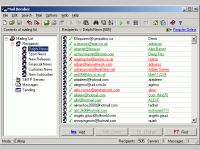
1st Mail Bomber is a professional email software, mass mailer, bulk mailer intended for fast sending personalized emails and mailing list management. It allows you to organize email-based subscription on your web site and to send newsletters, information and notifications to a large number of recipients. You can create and manage thematic mailing lists, import recipients from any files, and to generate personalized messages from predefined templates while sending. 1st Mail Bomber has really unlimited abilities, it can send emails in several different formats such as plain-text, HTML, and Outlook Express EML what enables you to dispatch colored messages with embedded graphics having an advanced look. Built-in SMTP manager can handle up to 48 different SMTP servers in 48 separate threads what makes sending very fast; your speed will only depend on your connection speed if you set up SMTP manager correctly. You can create separate mailling lists, which contain unlimited structured recipient lists, messages, and SMTP servers as well as use a built-in connection scheduler to start sending at a desired time. The interface of the program is very simple and easy to learn - nearly all functions can be performed using hotkeys on the keyboard. This software is a handy tool for keeping feedback from your clients or users, its a mailing list manager, a simple and handy address book, and a simple email program.

Download Mail Bomber

Wednesday, September 10, 2008

Game ZONE


Buat temen-temen yang suka Game Download disini..

Version Game Downloads!" src="http://i33.tinypic.com/30kytya.gif"/>

Saturday, September 6, 2008

Cara Memunculkan Kembali Folder Option Yang Hilang Terkena Virus

Komputer kita pasti pernah terinjeksi oleh virus,banyak sekali dampak yang di akibatkan oleh virus tersebut.Kadang Folder Option hilang, Task Manager, regedit bahkan hidden files tidak dapat dimunculkan.Nah kalo masalah kalian kaya gini ini dapat dipastikan Komputer kalian terkena Virus,kalo gak salah itu jenis Virus Trojan atau Brontok.Sebenarnya gampang saja untuk mengatasi masalah kaya gitu.Kalian cukup download saja Aplikasi ini untuk memunculkan kembali Menu yang disembunyikan oleh virus tadi.

Download Here

Cara Cepat Download Youtube


Ingin sekedar sharing aja,mungkin kalian suka download video2 gratisan dari internet.Nah kalian pasti sudah tak asingkan sama yang namanya Youtube??Yup di website ini terdapat jutaan Video dari seluruh panjuru dunia.Mulai dari video Music,film,OlahRaga,bahkan untuk yang Dewasa juga ada disini.Youtube memang tidak memberi batasan kita untuk mendownload ataupun mengUpload kontent yang ada didalamnya.Sangat bermanfaat bukan??

Mungkin kalian masih bingung gimana sih cara Download Video dari Youtube??Ini dikarenakan Youtube tidak memberikan Button Download langsung,kita hanya diberikan url saja.Nah kita download langsung dari web lain yang sengaja diciptakan untuk mengatasi masalah seperti ini.Dari pada kita repot-repot juga membawa Applikasi sendiri.Kalian tinggal Klik saja URL berikut untuk meluncur langsung ke website yang saya maksudkan.Jika kalian masuh ada kesulitan untuk masalah ini jangan malu-malu untuk meninggalkan Komentar.

(If you have any problem how to download a video from youtube,this is the easier way to do that.You just need to click the url link below.If you still have any problem with this post,don't be shame just leave a Comment and i'll help you.)

Click Here

Tuesday, September 2, 2008

Cara Log In Friendster Maintenance (How to Log In Friendster that was Maintenance)

Baru minggu 1 minggu aktif lagi di FS (friendster) eh kemarin tiba-tiba FS udah di Maintenance,kaya gini sih tulisanya:

Temporary Maintenance

Thank you for visiting Friendster. While our goal is to give you 24-hour access to Friendster, from time to time, we need to do maintenance to ensure you have the best possible experience. We will be back online shortly.

Waduh apa-apaan neh emg kenapa tuh apa gara-gara Adminnya pada lagi Puasa,jadi pada lemes tuh??Hahaha gak lah emang apaan??Padahal lagi pingin Upload foto terbaru neh,coz kemarin baru saja ngedit gitu deh,belum lagi mo bales postingan temen-temen tercinta seIndonesia tuh.

Mikir-mikir jadi inget waktu siasat diKampus kemarin,hehehe terbuka deh pikiranku waktu itu.Untuk masalah "Log In" di Friendster pada dasarnya sama aja.Tinggal kita utik-utik saja Navigation Tool Bar nya.Gini neh cara nya:
Udah,tapi koq tiba-tiba muncul lagi ya halaman maintenance??Gimana neh brur jadi sedih deh.Ehem-ehem gak usah sedih deh,setelah kita memasukkan Email dan Password kita tadi dengan benar,langkah berikutnya ialah kita ketik lagi pada Navigation Toolbarnya dengan :
http://www.friendster.com/user.php

Nah dengan begitu kita bisa deh masuk ke profil kita.Gimana gampang kan???Semoga bermanfaat.


How to Log In Friendster that was Maintenance

//---------- LINK WORTH------------